Friday, October 9, 2015

What's Going On? October 12-16th

Fundamentals of Programming

During our last week of class we were introduced to some powerful programming concepts including how to update variables and properties and how to add a time component to our apps.  Students have been working on the "Android Mash" app, which is similar to "Whack-a-Mole", in order to try out these new concepts.

At the beginning of the week, students will have the opportunity to customize their Android Mash app as well as finish up the portfolio page.  We will check in mid-week with a formative assessment to gauge our current level of understanding for properties, variables, and time.  At the end of the week, we will begin our "Pong" app.


Programming the Web 1

This week we will starting our sixth unit which will target our understanding of CSS (Cascading Style Sheets).  Students will read chapters 11 and 12 in our textbook and complete the reading guide.  We will also have our lesson 6 review questions to complete.

There will be three web assignments this week: 6A, 6B, and 6C which are all tutorials that can be found in the textbook.  Students are considered "on pace" in the class if lesson 6 is completed by the end of the week.


Programming the Web 2

This week we will learn some more advanced CSS concepts and add them to our portfolio pages.  Students will add a more advanced hover feature to the links on the home page.  Students will also work with transitions and timing and complete a formative assessment.  At the end of the week, students will be introduced to forms which allows the website user to interact with the web content.

Friday, October 2, 2015

What's Going On? October 5th-October 9th

Fundamentals of Programming


Last week students finished up their Soundboard App projects and PaintPot apps.  I was really excited to see such creativity with the soundboard projects.  I can't wait to see what you create next!

This week we will do a formative check-in to make sure we understand why our programs work.  In class on Friday students completed a worksheet to further investigate parameters, properties, and variables.  We will review the worksheet on Monday and prepare for a formative assessment.

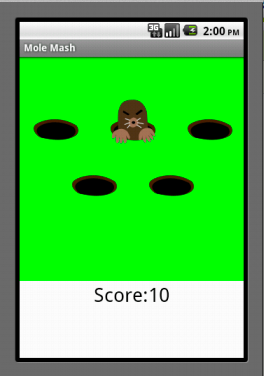
Later in the week students will talk about how our apps can incorporate updating variables and timing.  Students will have the opportunity to test these skills when we create the "Mole Mash" app.

Students are considered "on pace" if they have updated their portfolios through the "PaintPot" app and have completed the "Mole Mash" app by the end of the week.


Programming the Web 1

Last week students finished up lesson 4 where we learned how to incorporate links into our web pages.  This week students will learn how to properly link images and create "Image Maps".

This week students will also be introduced to the industry-standard program "DreamWeaver".  This is a program that a professional web designer may use to design and build websites.  Up until this point we have been using a text-based editor.  Now we will be introduced to this state of the art software that will allow us to add more features to our pages.

Students will be considered "on pace" for the course if they have completed the lesson 5 reading guide, the lesson 5 review questions, and projects 5A, 5B, and 5C by the end of class on Friday.


Programming the Web 2

This week students should be putting the finishing touches on their portfolio home pages.  Students should upload the page to a shared folder on Google Drive.  Once the home page is complete, we will investigate some more advanced CSS tricks to add to our pages.  We will try out a "button press" concept together in class and then we will add the feature to our home page.

Friday, September 25, 2015

What's Going On? September 28-October 2


Fundamentals of Programming

Last week students created their own media soundboard apps.  Students came up with some pretty great creations including animal sound and instrument tuning apps.  It was great to see students take initiative and get creative when it came time to design their own app.

This week students will complete the "Paint Pot" app tutorial.  Students will be introduced to a drawing canvas as well as to the coordinate system ingrained on the screen.  Students will also be introduced to the concept of a "variable" which is a very powerful tool when creating programs in App Inventor and other programming languages.  At the end of the week students should expect an individual formative assessment so we can get a gauge of our current level of understanding of these important programming concepts.


Web 1

On Friday we started our study of links.  Students will learn how to define paths in order to create links to external websites, other pages within our site, as well as internal site links.

This week students will need to read chapter 6 in our textbook while completing the reading guide.  As usual, students will have a 10 question multiple choice quiz to test their knowledge on some of the key concepts from the chapter.  Students are encouraged to view the questions before we take our assessment and plan out the responses.  The quiz is open book, open note, and open internet so I would expect to see high scores on this assessment.

We will also complete web assignments 4a, 4b, and 4c.  Students will have the opportunity to practice creating links as well as build on our personal web pages.  Students are considered "on pace" for the course if lesson 4 is completed by the end of class on Thursday.

Web 2

Students have been hard at work creating their personal portfolios.  Students have been working to design the home page for the site that will highlight our work of the semester.  Home pages should be completed and uploaded to Google Drive by the end of class on Friday.

Friday, September 18, 2015

What's Going On? September 21st-25th

Fundamentals of Programming

Last week in class we had a change in plans. Rather than proceeding to the "Paint Pot" app, students were introduced to the "Soundboard App".  This project gives students the opportunity to work with a partner in order to create their own app.  The requirements of this project include:

  • a complex user interface 
  • at least four media clips
  • some decision making (if)
Students will continue to work on the project throughout this week.  We will also review some key terms such as events, event handlers, function calls, and parameters.


Programming the Web 1

This week we will continue our study of lesson three.  For this lesson, students will need to read chapter 5 in their textbooks and complete the reading guide by Monday's class.  On Monday we will talk about some strategies for understanding the key concepts of web design as well as strategies for completing the lesson three review questions.  

Students will also have the opportunity to finish up our lesson 3 web page projects.  Lesson three focuses on adding lists and other HTML structure to our web pages. Students are considered "on pace" in this class if they have completed lesson 3 by the start of class on Thursday.


Programming the Web 2

Students should have completed the codecademy.com online tutorial which refreshed our memories of basic HTML and CSS techniques.  This week Web 2 students will work to create their web page portfolios that will serve as the backbone for the course.  Students may choose to create an online portfolio for a resume, they can create a website for a local business, or create a website that will work to display the project for another class.

Monday, September 14, 2015

What's Going On? September 14th - 18th

Fundamentals of Programming

This week we will be finishing up our "I Have A Dream" apps and analyzing the structures involved.  So far we have been introduced to some very powerful programming concepts and we didn't even realize it!  We have talked about events, event handlers, and if...else statements.  These properties are very powerful and will be utilized heavily throughout the course.

Once we finish analyzing the "I Have A Dream" app, we will move into the "Paint Pot" app where students will be introduced to the "canvas" tool.


Web 1

Early this week students will finish up their lesson 2 web assignments and complete the lesson 2 review questions.  All lesson review questions are open book and open note.  The questions are also available online so I encourage students to plan their answers BEFORE we take the assessment.

Later in the week we will move on to lesson 3 where students will learn some more HTML techniques.  Students will learn how to write code for lists, quotes, and address tags.  Also this week, students will read chapter 5 in the textbook and complete the lesson 3 review questions.


Web 2

Students will continue to work on reviewing HTML and CSS by completing the codecademy.com online tutorial.  Students are expected to have a 100% completion of the tutorial by the end of the week.  Once we have been reminded of some important HTML and CSS concepts, students will begin to plan their online portfolio site that will serve as the backbone for the course.

Tuesday, September 8, 2015

What's Going On? September 8th through 11th


Programming the Web 1

This week in Web 1 we will complete our first unit.  Students should have read chapters 1-3 in our textbook.  In order to help with the reading, I created a "reading guide" to help point out some of the important information and concepts.  Students should have the reading guide completed in time for Wednesday's class.  We will begin class on Wednesday with our lesson one review questions.  The questions have been posted on BlackBoard.  Students will complete the assessment on BlackBoard and may use notes and the textbook.

Once the lesson one review questions are complete, we will dive right into lesson two.  This week, students will be introduced to some basic HTML coding tags.  We will learn how to create a page and how to add some simple elements to it.  We will use "Notepad" in order to create a web page.  Later on in the semester, students will be able to use the industry-standard program, DreamWeaver, in order to create web sites.

For this lesson, students will need to read chapter 4 in the textbook and complete three web assignments.  Two assignments are presented as a tutorial in our textbook.  For the last assignment, students will begin to build their own personal web site that we will build on in the coming weeks.


Programming the Web 2

This week in Web 2 students will continue to brush up on their HTML and CSS skills by working through Codecademy's tutorial.  Once students have reviewed their web design skills they will begin to build a portfolio site that will house some of the work we will complete this semester.  By the end of the week, students should have designed and started to complete the home page for their personal portfolio site.


Fundamentals of Programming

Our Android tablets have arrived!  This week, we will work on testing our "Hello Purr" app to make sure everything is in working order.  We will also analyze our program and talk about some important programming concepts such as properties, events, and event handlers.  Students will post their "Hello Purr" apps and reflections to their online portfolios.

Monday, August 31, 2015

Welcome to the 2015-2016 School Year!

Welcome back to school!  My name is Mrs. Kamenar and I will be working with you in your computer class class this year.  This will be my eleventh year teaching at Waukesha North.  This year I will be teaching Honors Geometry, Fundamentals of Programming, Programming the Web 1 & 2 and Yearbook.  In addition to teaching at North, I am also an assistant women's cross country coach and the school's yearbook advisor.

Image result for waimea bayI hope that everyone had an enjoyable and relaxing summer.  This summer went by too fast, but I guess it always seems that way.  This summer I got to spend a lot of time with my husband and my two kids, Jack and Laura.  We spent our time going to the zoo, the children's museum, going to the library and swimming.  My husband and I took a few days to visit Hawaii where we were able to visit Pearl Harbor and have a lot of fun in the ocean snorkeling, kayaking, and cliff jumping.

My goal is to keep you up to date with what's going on in the classroom through this blog.  Between the blog and our class schedule of events that will be posted on our BlackBoard class website, it is my hope that all students and parents will be informed about what's going on in the classroom.

Fundamentals of Programming
In this course, students will be introduced to computer programming through MIT's App Inventor.  We will learn how to program some basic apps that are compatible with Android devices.  This week students will set up their free MIT App Inventor accounts, design our online learning portfolios, and program the "Hello Purr" app.  Through this "drag and drop" based programming environment, students will be introduced to the building blocks of computer programming.

Programming the Web 1
In this course, students will learn how to create and design web pages using HTML5 and CSS.  This course, which is offered as a transcripted course through WCTC, allows students to simultaneously earn high school credit through Waukesha North and college credit through WCTC.  The course is broken down into weekly lessons.  Each week students will be introduced to a new web design technique.  We will talk about the new concept in class and try out a sample together.  Students will receive a programming assignment which consists of between 1 and 4 web sites for the week.  Early in the semester, many of the assignments are presented as step-by-step tutorials from our class textbook.  Students will also need to read an assigned portion of the textbook and take a weekly assessment.

In this first week of class, we will talk about different methods of web design.  Students will look at existing web pages online and analyze the design.  Along with this week, we will see our largest reading assignment for the semester.  Students must read the first three chapters of the textbook in order to prepare for our first assessment.  Students will be provided a "reading guide" to accompany the text so that they can pick out the most important information.

Programming the Web 2
In this course, students will continue to learn about the principles of web design.  This course will include concepts such as advanced HTML5/CSS techniques, JavaScript and animation.  We will start the year with a review of some of the concepts learning in the Programming the Web 1 course.  Students will also start to build their web portfolios that will serve as the foundation for the entire course.

I am really excited to get to work with you this year.  I hope we are all able to learn a lot and have some fun along the way!  If you have any questions as we move through the year, please don't hesitate to contact me.