Friday, February 5, 2016

What's Going On? February 8-12th

Fundamentals of Programming
Image result for if then else mit app inventor
Students are considered "on pace" in this class if they finished lasted week by posting the "I Have a Dream" app to their portfolio sites.  This week we will talk about some of the principles that are working behind the scenes of this app.  We'll review the concepts of a property, events, and event handlers.  We'll also talk about the decision making that went on within the app through the if...then...else blocks used to turn the audio clips on and off to avoid overlapping media clips.  Once we have discussed the app, students will complete a formative assessment so we can check our level of understanding before moving on to new concepts.

After we make sure that we are all on the same page, students will pair up in order to complete our first creative project: the Soundboard App.  Students will design and implement their own apps.  In the past students have come up with some great apps for this assignment.


Programming the Web 1
Image result for html lists
This week we will start lesson three where we learn about lists, special characters, and ways to mark up large sections of text with HTML tags.

Along with this week, students will need to read chapter five of our textbook and complete the accompanying reading guide.  We will also have our ten multiple-choice questions during class on Friday.

Through the course of the week, students will work on three web assignments.  In 3A, students will demonstrate their ability to create three types of lists: ordered, unordered, and description lists.  In 3B, students will demonstrate their ability to mark up an existing web page using appropriate HTML tags.  Lastly, in 3C, students will demonstrate their ability to mark up an existing web page into large thematic sections with section, article, header, footer, and div tags.


Programming the Web 2

Last week, students decided on a web page that they would like to revamp and try to reflect current HTML practices and styles.  By the end of this week, student groups should have the home page of their web site complete.

Saturday, January 30, 2016

What's Going On? February 1-5th

Fundamentals of Programming

Image result for hello purr mit app inventorThis week students will be finishing up their first app, "Hello Purr".  We will continue to talk about the important programming components that we have encountered so far:

  • Design View of MIT App Inventor
  • Block View of MIT App Inventor
  • Visible Components
  • Non-Visible Components
  • User Interface
  • Properties
  • Events
  • Event Handlers
Image result for i have a dream mit app inventorOnce we have solidified our knowledge of these basic components, we will move on to our next app: "I Have a Dream".  In this app, we will add two buttons to the design view of our app.  When the user taps the picture of Martin Luther King, Jr. his "I Have A Dream" speech plays.  When the user taps the picture of Malcolm X we will pause the MLK speech before we start playing the Malcolm X speech.  While creating this app, we will explore the use of a "Player" component, including the play and pause features.  We will also be introduced to decision-making in apps through "if...then...else..." blocks.

Students are considered "on pace" for this class if they have the "Hello Purr" app portfolio page completed by the end of class on Tuesday and the "I Have a Dream" portfolio page completed by the end of class on Friday.


Programming the Web 1

This week we will finish up our first lesson and then dive into our second lesson of the semester.  We will start Monday's class will our lesson 1 review questions.  Once this is complete we will work on our first official web assignments.  During Friday's class we talked about appropriate file structure and created a sample first web page together.  This week, students will have the opportunity to put this into practice.  Along with our second unit, students will have our lesson 2 review questions on Friday (see BlackBoard for questions), and programming projects 2A, 2B, and 2C.  Through these three assignments, students will work with basic HTML and CSS structure.  We will follow a book tutorial, complete a "find the errors" assignment, as well as start to build a personal web page.  Along with the web page assignments, students should read chapter 4 in our textbook and complete the accompanying reading guide to help pick out the most important concepts in the reading.  Students are considered "on pace" for this class if unit 2 is complete by Friday's class.


Programming the Web 2

Now that we have completed our review of the basic HTML and CSS principles learned in Programming the Web 1, we will now focus on our work for the first part of the semester.  Students will be starting to create a website.  As the basic structure is complete, we will then start to employ new CSS techniques to improve upon the site's functionality.

Monday, January 25, 2016

Welcome to Second Semester!


Welcome to second semester!  My name is Mrs. Kamenar and I will be working with you in your computer class this year.  This will be my eleventh year teaching at Waukesha North.  This year I will be teaching Honors Geometry, Fundamentals of Programming, Programming the Web 1 & 2 and Yearbook.  In addition to teaching at North, I am also an assistant women's cross country coach and the school's yearbook advisor.

Fundamentals of Programming
In this course, students will be introduced to computer programming through MIT's App Inventor.  We will learn how to program some basic apps that are compatible with Android devices.  This week students will set up their free MIT App Inventor accounts, design our online learning portfolios, and program the "Hello Purr" app.  Through this "drag and drop" based programming environment, students will be introduced to the building blocks of computer programming.

Programming the Web 1
In this course, students will learn how to create and design web pages using HTML5 and CSS.  This course, which is offered as a transcripted course through WCTC, allows students to simultaneously earn high school credit through Waukesha North and college credit through WCTC.  The course is broken down into weekly lessons.  Each week students will be introduced to a new web design technique.  We will talk about the new concept in class and try out a sample together.  Students will receive a programming assignment which consists of between 1 and 4 web sites for the week.  Early in the semester, many of the assignments are presented as step-by-step tutorials from our class textbook.  Students will also need to read an assigned portion of the textbook and take a weekly assessment.

In this first week of class, we will talk about different methods of web design.  Students will look at existing web pages online and analyze the design.  Along with this week, we will see our largest reading assignment for the semester.  Students must read the first three chapters of the textbook in order to prepare for our first assessment.  Students will be provided a "reading guide" to accompany the text so that they can pick out the most important information.

Programming the Web 2
In this course, students will continue to learn about the principles of web design.  This course will include concepts such as advanced HTML5/CSS techniques, JavaScript and animation.  We will start the year with a review of some of the concepts learning in the Programming the Web 1 course.  Students will also start to build their web portfolios that will serve as the foundation for the entire course.

I am really excited to get to work with you this year.  I hope we are all able to learn a lot and have some fun along the way!  If you have any questions as we move through the year, please don't hesitate to contact me.

Friday, January 15, 2016

What's Going On? January 18-21st

Exam Week: January 18-21st

This week is the official semester exam week.  Please check the schedule to see where you are supposed to be and when.


Fundamentals of Programming

You will have the two class periods and the exam period this week to finish up your final project app and any other missing assignments.  Please make sure that your final project is posted to your portfolio website, including the .aia and .apk files, the QR code, pictures of your design view and block view, as well as the answers to the review questions.  If you need additional time to complete the app please talk with me.  


Programming the Web 1

You will have the two class periods and the exam period this week to finish up your final project website and any other missing assignments.  Please make sure that your final project is uploaded to your shared folder on Google Drive.  We will complete the multiple-choice portion of the exam during Thursday's exam period.  If you need additional time to complete your project please talk with me.  Remember, if you registered for the WCTC course and complete the course with a "C" or higher, you will earn WCTC college credit!


Programming the Web 2

You will have the two class periods and the exam period this week to finish up your final animation and any other missing assignments.  Please make sure that your final assignments are uploaded to your shared folder on Google Drive.  If you need additional time to complete your project please talk with me.  


Friday, December 18, 2015

What's Going On? December 21 and 22nd

Winter Break is Coming Soon!
This is just a reminder that we will follow a "Monday-style" schedule on Monday and Tuesday this week.  On Tuesday we will have a winter pep assembly, so we will be following a modified schedule.  You can check it out here.

Image result for mit app inventor presidents quiz
Final Exam Schedule
For those of you who like to plan ahead, you can check out the final exam schedule for the week of January 18th here.

Fundamentals of Programming
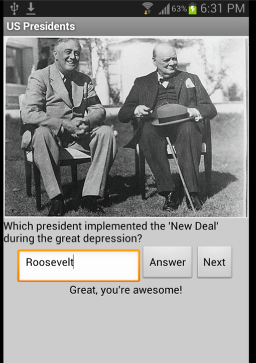
This week students should make sure that their portfolios are up to date and they should complete the tutorial for the "Presidential Quiz" app.  When we return from winter break we will talk about the different components that went into creating the app as well as adding some customization elements to it.


Programming the Web 1
Students should have web assignment 12A complete and uploaded to Google Drive.  Students who
finish this assignment early can continue on with assignment 13 where we add the three supporting pages to this website.  Once we return from winter break, students will finish our lesson 13 assignment and begin work on the final web assignment.  Please remember that students who signed up for WCTC transcripted credit class need to pass the class with a "C" or higher in order to earn college credit.


Programming the Web 2
Students have just finished a very quick crash course in JavaScript.  This week, students should complete the JavaScript portion of the St Mary's Neonatal Website and upload it to Google Drive.  Students need to make sure that their portfolios are up to date before leaving for winter break.

Have a great break!  

Friday, December 11, 2015

What's Going On? December 14-18th

Hour of Code

Thank you to all of the students that participated in last week's Hour of Code event.  As I write this blog post, over 166 million students from 180+ countries participated in this worldwide Hour of Code event.  If you were not able to join us or you would like to find out more about computer programming, you can check out the code.org website or the Hour of Code website that I used for our event.


Fundamentals of Programming

This week students will be working with lists and images in order to create the "Presidential Quiz" app.  Students will learn how to work through items in a list and to incorporate a timing element into the app.  By the end of the week, students will have created the basic app and added some customized elements to it.


Programming the Web 1


This week students will be working on lesson 12.  For this week, we will focus on how to format
images for a website using tools in Photoshop.  We will also focus on creating a layout.  Students will have the lesson 12 reading guide, the lesson 12 review questions, and web assignment 12A to complete for the week.  We are winding down in the semester and we only have one more formal lesson week for the course.  Soon students will be working on their final web page assignments which will be due during the last week of the semester.  


Programming the Web 2

This week students will dive into JavaScript.  Students will learn how to add an interactive piece to their web pages.  One of the first assignments we will work on for the week involves creating a web page for a restaurant that will automatically show the daily specials.  We will also work on a "Countdown" web page that will automatically calculate and display the number of days until winter break.