Friday, April 29, 2016

What's Going On? May 2nd-6th

Fundamentals of Programming

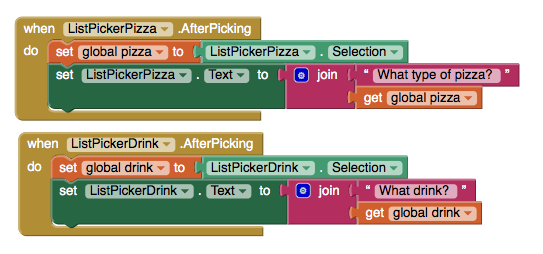
Last week we finished up our discussions of permanent data storage (using a TinyDB) and working with lists.  This week, students will create a "Presidential Quiz" app.  During this app, students will continue their work with lists and will also be introduced to the "List Picker" feature in MIT App Inventor.  Basically, we will use the list picker function to create a multiple choice style quiz.  Students will be considered "on pace" for the class if the app and portfolio page are completed by the end of the week.


Programming the Web 1

This week students will have the opportunity to work on our "Clear Reflections Homepage".  For this assignment, students will appropriately format images for web design using PhotoShop.  Students will also implement a layout from scratch based on a photo of the final site.  This assignment is excellent practice to prepare us for the final website project where students will design and implement their own layouts.

Students are considered "on pace" for the class if the Clear Reflections Homepage, the lesson 12 reading guide and lesson 12 review questions are complete by the end of the week.

Programming the Web 2

This week students will begin their study of animation.  In order to learn some key principles of animation such as keyframes and "tweening", we will use Adobe Flash Animation.  This week students will design a bouncing ball animation and a jumping letter animation.  This will allow students to gain an understanding of how to create keyframes, how to create and implement layers in an animation, as well as adding a simple "stop" action script.

Friday, April 22, 2016

What's Going On? April 26-29th

ACT Aspire Testing for Freshmen

This week on Tuesday and Wednesday freshmen will participate in ACT Aspire testing.  (Please note that there is NOT SCHOOL on Monday.)  Students who are in class on these days will use this time to catch up on work and to review concepts to make sure that we are ready to finish the year on a positive note!


Fundamentals of Programming

This week students will complete a formative assessment to gauge our current level of understanding of lists and permanent data storage.  We will make sure that students understand the concept of a list (think arrays) and how to work through all of the elements on the list (think loops).  We will also work with permanent data storage through the use of a "TinyDB" which would allow for data to be stored after an app has been closed.


Programming the Web 1

Students will use Wednesday's and Thursday's classes to complete our lesson 11 web assignments and  to catch up on old assignments.  Students who are caught up can use the class period to dive into our lesson on editing images for web use or to complete our weekly reading guide.

Programming the Web 2

Students will finish up their JavaScript assignment on "St. Mary's".  Once this is complete, we will move into our animation unit.  Students will explore the use of a time line and animation.

Friday, April 15, 2016

What's Going On? April 18-April 22nd

Fundamentals of Programming

This week students will be working on our next app: "No Texting While Driving".  In this app, students will learn how to send an automated response while they are driving that lets people know that they are currently driving and will text back later.  While we create this app, students will be introduced to the messaging and texting feature that is available in MIT App Inventor.  Since we have access to tablets without phone/data plans, the texting feature will not be testable on our devices so students who have an Android device will be welcome to test their programs on their phones.  Students can also explore the "TinyDB" component of App Inventor during the customization process which allows for permanent data storage.


Programming the Web 1

Image result for responsive web designThis week students will work with unit 11.  During this unit, students will read chapter 18 and complete the accompanying reading guide.  Students will also complete assignments 11A and 11B.  During this unit, students will learn how to add responsive web design to their web pages.  In other words, students will learn how to design a web page for multiple device displays: mobile devices, tablets, and desktop computers.  We will learn how to use one HTML code and apply different CSS styles in order to best display the page for the chosen device.  Students will achieve this using a "Media Query".


Programming the Web 2

This week students will be wrapping up our JavaScript unit by completing the "St. Mary's Neonatal" webpage.  Earlier in the semester, students wrote the HTML code for the table and form that will serve as the basis for our web page.  Students will add JavaScript in order to verify data, add data, and display the correct date.

Friday, April 8, 2016

What's Going On? April 11-15th

Fundamentals of Programming

This week students will complete their second summative assessment for the semester: the animation unit creative project.  Students have been busy designing and implementing their own apps.  Some students have decided to recreate games such as "Asteroids", "Pac Man", and "Breakout".  Other students have created sports-related apps, creating baseball and basketball games.   This week, students will put the finishing touches on their apps, answer some reflection questions, and post their apps to their portfolio sites.  Once this is complete, we will talk about some other elements of app development: lists and locations.  We will talk about an app, "No Texting While Driving", which sends an automatic reply via text message when a person is driving.


Programming the Web 1

This week we will work on lesson 10 of our unit where we will talk about new methods to organize page layouts.  We will explore the use of margins, negative margins, and floats as they relate to fixed layouts, liquid layouts, and hybrid layouts.  We will create some sample layouts that students could potentially use as the basis for their final project.  As far as assignments go for this week, we will have a reading guide, our lesson review questions, and assignments 10A, 10B, and 10C.


Programming the Web 2

This week students will work to finish up their "Countdown" webpage that uses JavaScript to countdown the number of days until the end of the school year.  Students have also been working with "conditionals" to display special messages for the exam schedule during the last week of school, a special message to display during summer, and how to disable the message once the next school year begins.  After this assignment is complete, students will work on creating a random number to display a different quote on a webpage each time it loads.  Students will work with random numbers and continue to work with arrays to complete this assignment.

Friday, March 18, 2016

What's Going On? March 21st through 24th

Fundamentals of Programming

Image result for pong mit app inventor 2During this short week leading up to spring break, students will be working on the "Pong" app and the "Get the Gold" app.  Students are continuing to learn about animation through tutorials.  Once these apps have been completed and our portfolio pages have been updated with the app information and the reflection questions, students can begin working on their second creative project.  Our work on the creative project will begin after spring break.  Students are considered up to date for the class if all animation work and portfolio pages have been updated prior to spring break.


Programming the Web 1

During this short week leading up to spring break, students will have all three class periods to work on the midterm project.  Students have been given the task to create a website made up of four web pages about a "Border Collie Rescue".  All websites must be uploaded to Google Drive prior to spring break.  Students who need additional time to complete their site may see me to arrange for extra time before school, after school, or during lunch.

On Wednesday of this week, students will complete the 20 question midterm exam based on the 80 total multiple choice questions that we have seen so far this semester.


Programming the Web 2

Image result for javascript countdownThis week Web 2 students will begin experimenting with "JavaScript".  We will learn a little bit about how we can add a little more functionality to our web pages.  This week we will explore how to correctly display the current date on our page as well as how to create a countdown to a specific date.

Friday, March 11, 2016

What's Going On? March 14th-18th

Fundamentals of Programming

This week students will be finishing up their animation challenge portfolio pages and then transitioning over to the Pong app.  Students will apply their knowledge learned during the animation challenge to create the arcade-style game pong.  In this app, students will apply the "bouncing ball" feature we worked with in the animation challenge.  During this game, students will revisit the idea of variables and properties in order to keep score.


Programming the Web 1

This week we will work on lesson 8 where we will discuss properties of the box model.  We will learn how to apply margin and padding to different elements in order to enhance the style of the page.  Along with this week, students will have a reading guide to go along with Chapter 14 in our textbook, the lesson review questions and one web assignment: 8a.  This week includes fewer assignments, so we will wrap up lesson 8 on Wednesday of the week.  This will allow us to begin our midterm exam project on Thursday.  Students will have from Thursday (3/17) through Thursday (3/24) to complete the website and the accompanying multiple choice assessment.  All midterm websites MUST be uploaded to Google Drive before spring break.  Please let me know if you need additional lab time in order to complete your project!


Programming the Web 2


Students will begin the week by finishing up our formative form assignment.  This form assignment will be used again later in the semester when we learn to apply JavaScript to process the form.  It is extremely important that this assignment is done well in order to complete the second part.

Once the form is complete, students will then incorporate a simple form into their redesigned website.  This could be a job application form, a survey, an online ordering form, or a contact form to submit a question.  The form should make sense within the context of the redesigned website.

Friday, March 4, 2016

What's Going On? March 7-11th


Image result for mit app inventor animation

Fundamentals of Programming

This week we will be exploring animation in MIT App Inventor.  Students will start the week by learning how to get a simple object (a ball image sprite) to move across the screen using a clock element and by using a heading element.  Once the animation challenge is complete, students will start working on the "Pong" app.  This is very similar to the arcade-style game and students will be able to apply their knowledge of animation to a game-style app.


Programming the Web 1

This week students will begin work on lesson 7.  This week we will explore colors and backgrounds using CSS properties.  Students will have a reading guide to complete to guide students through the text in chapter 13, our lesson 7 review questions, and web assignments 7a, 7b, and 7c.  Students are considered "on pace" for the course if lesson 7 is completed by the end of class on Friday.  Students who need additional time in the computer lab may talk with me about gaining access to the lab.  The lab is available every morning beginning at 7am and by appointment after school.


Programming the Web 2

At the beginning of the week, students will wrap up their image gallery for their redesigned web page.  Once this is complete, we will take a closer look at tables and forms.  We will learn how to create a form in order to get information from our web user.  We will also learn how to format items using table properties.