Wednesday, February 15, 2023

What's Going On? February 20th through 24th

 Snow Day!

I'm sure that you have heard by now, but we will not have school on Thursday, February 16th.  Enjoy your snow day!  I will see you again on Monday.


Thought for the Week


AP Computer Science Principles

This week, students will continue to work on their APCSP "Create" Performance task.  At the start of the
week, students will have 8 hours and 6 minutes of additional class time to work on their projects.  At the end of class on Wednesday (2/16), I had students complete a form where their assessed their own progress on the project so far.  I have sent this information home, as well as a note about what I have seen in class, to keep lines of communication open on this very important project.  All projects must be submitted to either me or the AP board by May 1st at 10:59 EST.  This project accounts for 30% of the AP score.


App Development 1

We will start off this week by working on our first summative end-of-unit app challenge, "Hello World".
  In this app, students will show off their ability to add elements to our storyboard, make connections to our code, and experiment with using variables.  At the end of the week, we will move into our second unit where we will focus on using text fields to get some user interaction into our apps as well as performing some basic math operations.


App Development 2
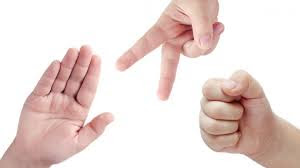
This week, students will be working on our first summative end-of-unit app challenge, "Rock, Paper, Scissors".  In this app, students will display images to represent rock, paper, and scissors, for our human player to choose from.  Students will also randomly select a choice for the computer.  Using logic statements, students will be able to declare a winner of the round.  Additionally, students will work on linking to a website to display the rules as well as using the camera and photo library for the user to customize their experience.


Friday, February 10, 2023

What's Going On? February 13th through February 16th

Thought for the Week


Modified Schedule This Week

As a reminder, we will have an early release day on Thursday and we will not have school on Friday, February 17th.  Because of this, the schedule for the entire week will be shifted by a day. This will make Monday a "Tuesday"-style schedule, Tuesday a "Wednesday"-style schedule, Wednesday a "Thursday"-style schedule, and Thursday will be a "Friday"-style schedule with shortened class periods.


Conferences By Appointment: Wednesday, February 15th

This Wednesday, from 4-6, Waukesha North will hold parent-teacher conferences.  These conferences are available by appointment only.  If you would like to meet, please reserve your spot by clicking here.


AP Computer Science Principles

This week, students will continue working on their APCSP Performance "Create" task.  At the start of this
week, our countdown is at 10 hours and 4 minutes of class time dedicated to working on writing an original programming project and crafting the responses to this project via the AP writing prompts.  Students are welcome to work on this project outside of class and can always request to be added to my JIT class to have additional time to work.


App Development 1

This week, students will spend the first part of the week wrapping up our "Variables Code Challenge" and summarizing what we have learned in our second technical blog post.  Then, we will move into our first end-of-unit app challenge called "Hello World".  Students will demonstrate their ability to add items to the storyboard, make connections, and work with variables in our first summative project.


App Development 2

At the start of this week, students will have time to wrap up the Loops Coding challenge.  For the rest of the week, students will learn how to work with web pages within our app and how to access the features of the camera.


Friday, February 3, 2023

What's Going On? February 6th through February 10th

 Thought for the Week


AP Computer Science Principles

On Monday, students will have the opportunity to wrap up any remaining projects we have been working on so far this semester (2.1.4: Designing the User Experience, 2.1.5: Securing Sloppy Code, and the Tic-Tac-Toe Tutorial) and to brainstorm ideas for our AP Create performance task.  For the rest of the week, students will have time to work on their projects.  As dictated by the AP board, students will have 12 hours of class time to work on writing their code and responses for the project.  All projects will either be turned into the AP board or to me for grading.  The AP board deadline for the Create task project is May 1st.


App Development 1

This week, students will first learn how to add an Image View to our projects.  This is like a picture frame that can hold a variety of photos.  Next, we will learn about variables and constants.  Students will read about and apply their work with variables throughout the week through a demo assignment and a code challenge. Students will finish the week by summarizing their thinking in our second technical blog post.


App Development 2

We will start off this week by working on our Collections Code Challenge.  In this code challenge, students will work with arrays and dictionaries in order to display information in an app.  Students will use an array to save their favorite movie titles and display them.  We will work on adding to our list and removing items from our list.  Additionally, students will create a dictionary to keep track of their favorite movies along with the star rating.  For the rest of the week, students will focus on loops and how we can use them to repeat a section of code or to iterate through a list.

Friday, January 27, 2023

What's Going On? January 30th through February 3rd

 Thought for the Week


Winter Spirit Week Dress-Up Days


AP Computer Science Principles

This week, we will start by taking a look at activity 2.1.5: Securing Sloppy Code.  Within this activity, we
will take another look at the types of errors that may occur in our code.  We will also talk about ways to avoid errors by verifying user input and combining our logic statements using boolean opearators.  Once we have finished with this, students will partner up to work through a Tic-Tac-Toe tutorial to get a little more experience working with GUI (graphical user interface).  Looking ahead: the following week, students will beging their work on the AP Create Task that will be submitted to the AP board as part of our exam score.  Students who have not signed up for the AP exam will still complete the project and will submit it to me for grading.


App Development 1

This week, our focus will be on "Actions and Outlets".  Students will continue our practice of creating labels and buttons and connecting them to our code.  We will practice using and event, like tapping a button, to make something happen.  This week, students will participate in a code demo, a code challenge, and we will summarize our learning in our first technical blog post.


App Development 2

We spent our first week checking out the new version of Swift: SwiftUI.  Now it is time to switch gears
and check out the legacy language of Swift that includes designing with Storyboard.  Our first task in our new unit will be our first pre-unit hackwich: Three Letter Word.  In this project, students will learn how to cycle through a list of letters, will revisit how to add a tap guesture recognizer, and how to create an alert.  Once this is complete, we will take a closer look at Collections, Arrays, and Dictionaries. 


Monday, January 23, 2023

What's Going On? January 24th through January 27th

Thought for the Week


AP Computer Science Principles

As we begin our second semester, we will continue on with our study of "Data Diligence".  This week's
focus will be on incorporating graphic elements into our Python code using a platform called Tkinter.  We will also take a look at some ways to make our code a little more robust.  For example, if we write a program where the user is required to enter a number, and then enter a letter, we can catch that error and address it rather than allowing our program to crash and end.  Along with this week, students will tackle the formative work with Activity 2.1.4: Design the User Experience and Activity 2.1.5: Securing Sloppy Code.


App Development 1

Welcome to the exciting world of App Development!  In this class, students learn how to create apps for
Apple Devices using the Swift programming language.  This is an introductory class where students get to start coding right away!  We will use the XCode platform in order to create our apps. Students will get to try their hand at design as well as programming when we tell the program what it needs to do and how to do it.  One of the first apps that we will tackle is a basic flashlight app.  Through this app, students will become familiar with some of the tools available in our XCode platform.


App Development 2

Welcome back, App Developers!  This class is the follow-up course to App Development 1.  

In this second semester class, we will tackle more advanced topics such as TableViews, Maps, and some gaming elements.  There are some exciting things happening in the world of Swift and a new implementation of the language is coming onto the scene.  SwiftUI is a new way to take a look at the coding language.  We will start off this week by dabbling a little bit with some introductory topics to get students working together and communicating as we start off the semester.


Tuesday, January 17, 2023

What's Going On? Exam Week

 Thought for the Week


Exam Schedule


AP Computer Science Principles

During Tuesday's class, we will play a short review game as well as go through questions from the exam study guide.  During our exam period on Wednesday, students will complete a multiple-choice summative that is in a similar style of what they will see on the AP Exam in May.  Students who need additional time or need to catch up on missing work are invited to come in during our review/conferencing time.


App Development

This week is devoted to our final project.  For the project, students are tasked with learning something new!  Students will learn via a website or a video to implement a Swift feature of their choice.  Then, students will create a video that is 7 minutes or less to show off what they have learned.  Students will be assessed on their code execution as well as the explanation within the video.  Students also have the option to enter their project into the Mobile Makers Winter Contest for a chance to earn prizes such as mentorship with a computer professional, t-shirts, and gift cards.  Click here to see the entire contest rules.  Students who need additional time or need to catch up on missing work are invited to come in during our review/conferencing time.


Programming the Web 1

On Tuesday, students will complete a 20-question multiple choice assessment about a variety of HTML and CSS tools.  In order to prepare for this, students can study from their packet of possible questions that we have been working through over the course of the semester.  Once this is complete, students will spend the remaining time finishing up their final web projects.  Students have been tasked with creating a four-page website about the topic of their choosing.  While creating the project, students should highlight many of the HTML and CSS tools we have learned about during our semester together.

Friday, January 6, 2023

What's Going On? January 9th through January 13th

Thought for the Week


Semester Exam Schedule


AP Computer Science A

At the beginning of this week, students will put their "hacking" skills to the test and use "brute force" in order to determine a user's password.  We will talk about password strength and some of the reasons that multi-factor authentication is needed in order for tech users to access their accounts.  Once we wrap this up, we will focus on our semester exam preparations.


App Development

Students will spend the first part of the week wrapping up our "Word Play" end of unit app challenge.  This is a "Mad-Libs"-style app that will allow users to enter in their own chosen words and enter them into a fun story.  Once we finish this, students will work on their final Swift Screencast project.  Click here to find out more details of the project as well as the contest students may enter.


Programming the Web 1

Students will continue work on their final web assignment project.  Students are tasked with creating their own site that consists of four web pages.  Students will highlight all that they have learned over the course of the semester, including proper HTML markup and using CSS style to make our pages look great!